Page 1 of 1
3D Printer
Posted: Sun Dec 07, 2025 9:15 pm
by Ralph F
Has anyone here on the forum using or considering us a 3D Printer to make patterns for casting parts.
Fitz
Re: 3D Printer
Posted: Sun Dec 07, 2025 9:46 pm
by Tbird
When needed certain pieces for my Delivery Car, I acquired the original blueprints from The Henry Ford. I then drew them up in CAD and 3D printed them to be cast.
I made rear fender irons and rear door handle parts that allow the door to shut and lock. I also 3D printed 4 of the different braces/irons that hold the body together so I could get an idea of what they looked like and how they would function and then I had the braces/irons bent and made out of steel. All these pieces were unique only to the Delivery Car.
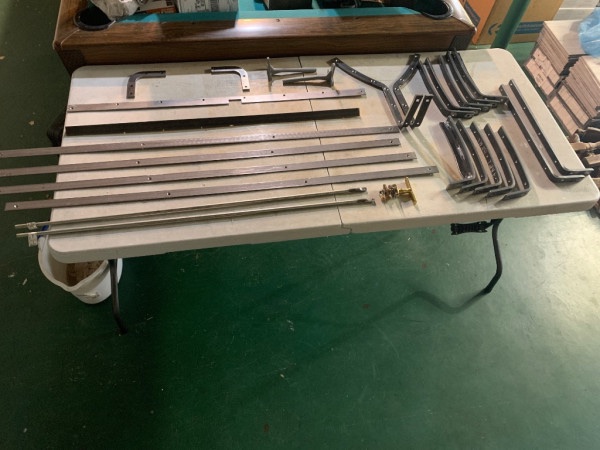
- IMG_4261.jpeg (96.23 KiB) Viewed 1682 times
Re: 3D Printer
Posted: Sun Dec 07, 2025 9:53 pm
by Kevin Pharis
3D printed patterns are fairly common practice these days. The hard part is still the hard part tho… shrinkage and gating. They will hold up to sand pounders if printed with adequate “fill”, also can be used for certain lost wax molds when using the right materials
Re: 3D Printer
Posted: Sun Dec 07, 2025 11:20 pm
by frontyboy
An Engineer (Brass car collector)friend is now working on his 1907 National 50 hp. He was missing all of the correct spark and throttle pieces including the quadrant with teeth on both sides. All he had was an old photocopy of the quadrant.
He worked with the photo to clean it up then used his 3d printed to make the quadrant, and the 2 levers. He then took the plastic parts to a foundry and had the pieces cast. He did add size to the parts for shrinkage. I will tell you the parts are just as if he ordered them from the factory
When you get back to Seattle I will take you to meet him and view his incredible early Ford collection and his very large early brass car collection.
just sayin'
frontyboy
Re: 3D Printer
Posted: Sun Dec 07, 2025 11:22 pm
by Mike Silbert
Yes, I 3D print my patterns when I need them cast.
Once it it in CAD you can print a full size sample to check fit and function if you want.
And they can easily be scaled to account for shrinkage.
If you want it smoother (quick printed) then add Bondo and sand to ridges.
It just has to stand up to medium compression when ramming the mold.
My father used pencil drawings (T square and triangle) then made wooden patterns, I use Cad and printed patterns.
It all does the same job just a different way to get there. Old school still works just like it always has.
I still use my T square and drawing kit when I need a quick sketch.
And ironically, tomorrow (12/8) I am going to the foundry to pick up parts and drop off the next batch of 3D printed patterns.
Check out makerspaces and libraries in your area, they may have CAD programs to use, CAD training, 3D printing, laser cutting, Laser 3D scanning and more for free or low cost in your area. It is amazing what is out there now if you just go looking.
Mike
Re: 3D Printer
Posted: Mon Dec 08, 2025 1:53 am
by A Whiteman
We are planning getting body bracket parts cast at the moment (for a Colonial bodied T - so not 'standard' T bits).
Originals have been 3d scanned and put into CAD.
They will be printed in PPA (at least I think that is it) and the cores will be used in investment casts.
The cast is heated sufficiently to melt out the core before the metal is poured in.
For silicon bronze we allow about 3% shrinkage and are prepared to have more than one attempt.
Once we get going on the project I will keep you updated on how we fare,
Re: 3D Printer
Posted: Tue Dec 09, 2025 12:10 am
by fbergski
I used my 3d printer to make rubber door cushions for my coupelet. I had an old hardened on so I made a 3d model of it, saved it as an STL then to the printer it went. There's a multitude of filament types available, rubber is one of them. I changed the density by the amount of infill. Also created coolant adapters to back flush the coolant system.
Re: 3D Printer
Posted: Tue Dec 09, 2025 6:16 am
by Ralph F
Thanks for sharing your knowledge with me. My next question is what cad program do like to use or would suggest?
Fitz
Re: 3D Printer
Posted: Tue Dec 09, 2025 7:35 am
by Tbird
Ralph F wrote: ↑Tue Dec 09, 2025 6:16 am
Thanks for sharing your knowledge with me. My next question is what cad program do like to use or would suggest?
Fitz
Fitz,
Depends on what you’re wanting to spend. There’s some free stuff out there, but it’s limited. Also are you using a windows platform or Mac? I’ve noticed though there has been a shift to online apps now that you have to pay a monthly subscription.
Re: 3D Printer
Posted: Tue Dec 09, 2025 7:39 pm
by John E. Guitar
I use Solidworks as I have it at my workplace. It's probably a bit pricey for casual use.
There is an online program called Onshape that has a free version. That would be worth checking out.
https://www.onshape.com/en/
Regarding 3d printers, I would suggest looking at a Bambu Lab printer. They seem to be the best value at the moment.
Re: 3D Printer
Posted: Tue Dec 09, 2025 8:35 pm
by Mike Silbert
I used SolidWorks for 20 years until work closed and I was unwilling to pay the very pricey license fees for my occasional use.
I converted to using Fusion360 for my use.
It is free and by the same people who wrote AutoCad
https://www.autodesk.com/products/fusion-360/overview
If you are non commercial you can jump through a few of their hoops and use it for free.
None of the CAD programs run, look, and feel the same so there is a learning curve for EVERY one of them even changing between them.
I switched to Fusion360 because it is free (and so are several other programs), My dad uses it, a friend uses it (and used to as question me about how to use it), I can get classes (@ the local library Makerspace) on how to use it for free plus I can use it at the makerspace and get help from them if I get stuck.
I chose it because it was already all around me.
The program is a personal login style and not computer specific so I can work on the same file in multiple places if I want to.
ALL programs have strengths and ALL have weaknesses.
ALL programs have a learning curve and have online training to help you get up and running.
Choose the program that does what you want and you can get help from someone when you need it.
Getting help when you need it could possibly be the most important feature when choosing which one.
3D printers:
I don't personally have one.
We used to have 4 of them at work before it closed.
My dad has one, my brother has one, I have friends that have them, and I can print through the local makerspace.
There are also many on line print services.
They are all around me so I was never serious about getting one for myself.
When getting started look into what people have and use - like you asked here.
But also look into where to get help an possible places to try stuff out before buying.
The 3D printer market is changing rapidly with a huge variety out there.
Makerspaces are everywhere and all of them are different so see what they have to offer.
Maybe they have a 3D printer for you to use and learn on until you decide to make the plunge.
Re: 3D Printer
Posted: Tue Dec 09, 2025 9:02 pm
by Marc Roberts
Fitz:
My son and I have recently added 3D scanning to our 3D printing capabilities. With an original to work from or even a crude mock-up, such as a wood or clay model, you can simply scan an object and skip creating a CAD drawing. Quality scanners have recently become more affordable to home hobbyists. The scanned image is accurate to a millimeter and can be scaled to deal with casting shrinkage. You can then use the scanned file to 3D printed pattern. A resin printer or a filament printer can make very well-finished printed objects for patterns. You can slice up a large object in the computer, print its pieces within the size capability of your printer, and glue the printed pieces together to make larger objects. With the filament printer you can also print directly to investment wax for casting (we have purchased a spool of wax but have yet to try this). Pretty amazing stuff.
Re: 3D Printer
Posted: Fri Dec 12, 2025 1:40 am
by fbergski
When I was working I used Catia mostly then once I retired I used tinkercad (free online), Freecad (download free) and then I tried OnShape which I'm currently using, Reminds me of Catia so it was easier for me to learn. Freecad is more complex and has some issues as it's freeware. OnShape is free for personal use but is an paid product if you're a company so it's well supported.
For 3D printing I use Cura as I have a modified Ender 3 Pro that I've built over the last four years.
Re: 3D Printer
Posted: Fri Dec 12, 2025 6:13 am
by dykker5502
I read all your experiences with big interest. I have bought a used #D printer a while back but have not yet got it going.
Any way - I need som mirrors for my acetylen headlight for my 1914 Model T touring, and I am considering if I could print these, get them silvered and that that will, apart from reflecting the light, also reflect the infrared radiation so that the plastic will not melt. If it do, well, next step will be to use the 3D print as template and then have is made in another material (some metal). Or maybe I should frop down to the local glass blower and ask for advice

Re: 3D Printer
Posted: Fri Dec 12, 2025 8:04 am
by Mike Silbert
When using 3d printed parts there are some possible weaknesses you might run into.
Filament prints (the cheap extruded printer types) are porous so will not hold pressure, vacuum, or liquids.
This porosity also creates major issues when plating.
The chemicals can not be rinsed properly and will seep and cross contaminate and show back up for a very long time after the part is "finished".
There are things that can be done to minimize, work around or eliminate this but most just use a different process.
3D prints can also be soft, move with temperature, and move with humidity changes.
They are a low temperature melt in the cheaper printers.
I love 3D prints for fit checks, sample assemblies, casting patterns, and some simple assemblies.
If this were my project I would make the CAD model and 3D print sample parts to make sure it fit and worked properly (add aluminum foil for a test)
Once the design was perfected then use the sample and file to talk to glass places and some online printing places to see what they can do for you.
You will have a model and drawing so you can decide and proceed from there.
There are 3D printing process that are plateable and would hold up better if you want to go there.
If you never intend to light the lamps you can make 3D printed press forms and stamp aluminum sheets to the parabolic shape.
Glue them to 3D printed backers and make a decent looking set of mirrors.
There is always the "Kentucky Chrome" (Spray can chrome paint) option if a cheap show is what you want.
As always; things start with an idea, proceed to designs, samples, and tests then finally ending up as a finished product.
I am curious as to how this turns out. It sounds like something I would try if I had time to play.
Mike Silbert